

TL;DR
A proper GA4 setup for a small business takes about 60 to 90 minutes. Four things matter: install the tag, define your real conversions (calls, form fills, bookings), filter out internal traffic, and link Google Ads and Search Console. Skip the 200 reports Google shows you by default. If a metric does not tie to a lead or a dollar, ignore it. Most small businesses only need 4 to 6 events, tracked well.
Use GA4 as the record of where your leads come from, not as a wall of numbers. Install the tag once and mark calls, form fills and bookings as key events. Filter out your own visits, and link Google Ads and Search Console. Then open three reports each month and make one decision from them.
Why GA4 Matters for Small Businesses
Let us be blunt. Most small businesses have GA4 installed and have never made a single decision from it. They glance at “users” and “bounce rate,” feel vaguely informed, and close the tab. That is not analytics. It is decoration.
GA4 matters because it is the free, default record of where your customers come from. It also shows what they do before they buy. Done right, a GA4 setup for a small business answers one question: which marketing actually brings in leads and revenue? Done wrong, it gives you a screen of numbers that move up and down and mean nothing.
We do not care how many people visited your site. We care how many called, booked or filled out a form, and where those people came from. That is the whole idea behind this guide. The goal is to connect that data to real lead generation. The setup below is the foundation.
What You Need Before You Start
You can do this yourself. A standard small-business website does not need a developer. Before you begin, gather these:
- A Google account that you control, not your former web designer’s.
- Admin access to your website, or the login to your content management system (the tool you edit your site in).
- Google Tag Manager (recommended), or a way to paste a tag into your site header.
- A list of your real conversion actions. Write these down first: phone calls, contact form submissions, quote requests, online bookings and newsletter signups.
Most people skip that last item, yet it matters most. If you do not know what counts as a win for your business, no analytics tool can tell you. Decide before you touch GA4.
GA4 Setup for Small Business: Step by Step
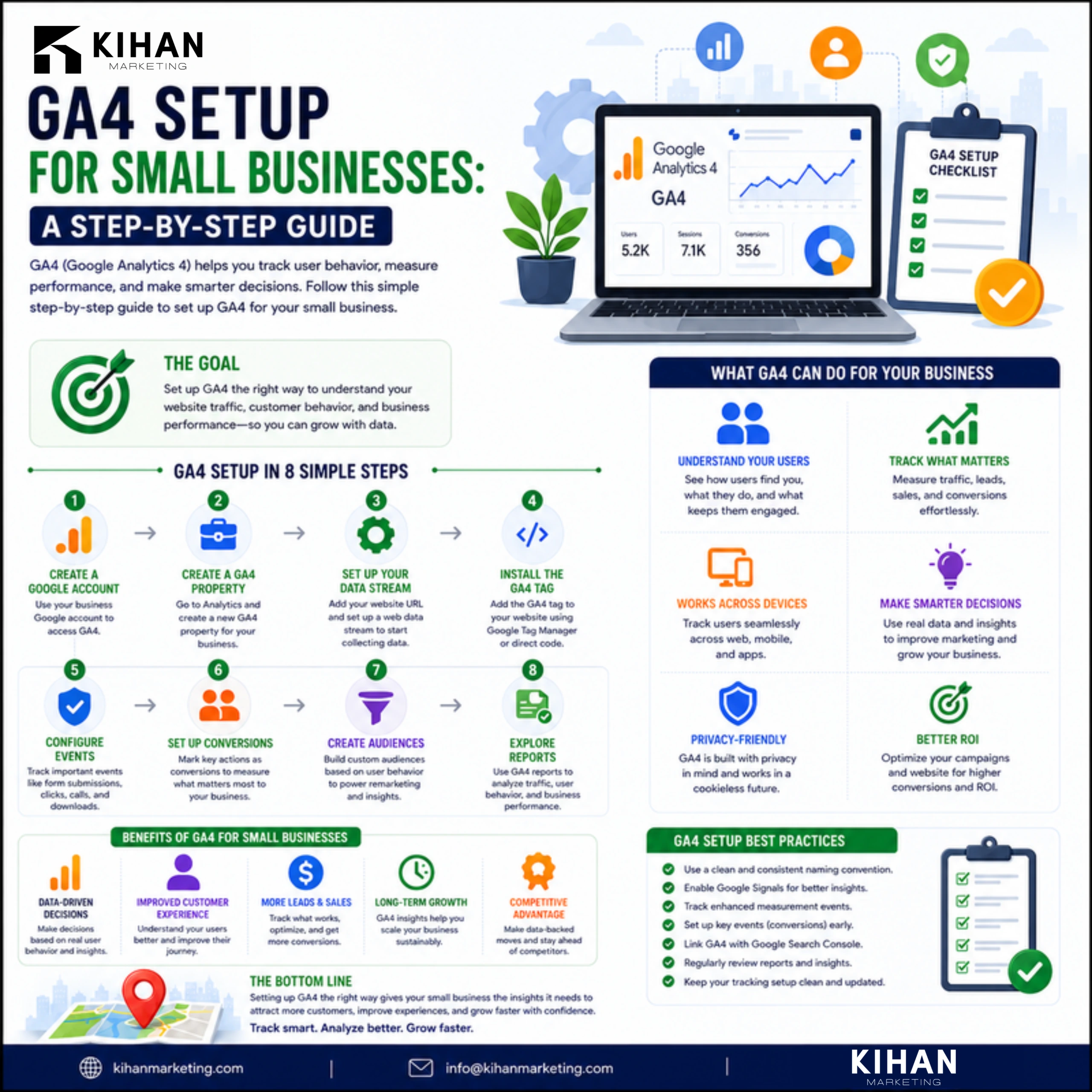
Here is the full GA4 setup for a small business, in order. Set aside about 60 to 90 minutes.
- Create the GA4 property. In Google Analytics, go to Admin and create a new property. Set your time zone and currency correctly. Currency matters if you ever track revenue.
- Add a web data stream. Enter your website URL. GA4 then gives you a Measurement ID that starts with “G-”.
- Install the tag. Google Tag Manager is the cleanest way. Create a GA4 Configuration tag and paste in the Measurement ID. Set it to fire on All Pages, then publish. Not using Tag Manager? Paste the Google tag snippet into your site header, or use your platform’s built-in GA4 field.
- Check that it is firing. Open GA4 Realtime, then visit your own site. If you see yourself appear, the tag works.
- Turn on enhanced measurement. GA4 tracks scrolls, outbound clicks and file downloads on its own. Leave this on, since it is free signal.
- Define your conversions (key events). This is the real work, and the next section covers it.
- Filter internal traffic. Exclude your own IP address so your team’s visits do not pollute the data.
- Set data retention to 14 months. Go to Admin, Data Settings, Data Retention. The default is shorter, and you will want the history.
Once the tag fires and your conversions are defined, you have a working setup. Everything after this is fine-tuning.
The Conversions That Actually Matter
This is where a GA4 setup for a small business succeeds or fails. Google will happily show you dozens of metrics. Almost none of them matter. Here is how to separate signal from noise.
Metric | Track it? | Why |
Form submissions | Yes, as a key event | Direct lead, ties to revenue |
Phone call clicks | Yes, as a key event | Highest-intent action for most local businesses |
Booking / quote requests | Yes, as a key event | Bottom-of-funnel intent |
Outbound clicks to booking tools | Yes | Catches conversions that finish off-site |
Pageviews | Context only | Volume, not value |
Bounce rate / engagement rate | Rarely | Easy to misread, rarely actionable |
“Users” by itself | No | A vanity number with no decision attached |
To set up a conversion, first trigger the event. A thank-you page view or a button click works well. Then, in Admin, mark that event as a key event. For phone numbers, track clicks on the “tel:” link. For forms, track the confirmation page or a form-success event.
Most small businesses need only 4 to 6 of these, tracked well. It is the same lead-first thinking behind our home services marketing, where one booked job is worth more than a thousand pageviews.
Connecting GA4 to the Rest of Your Stack
GA4 is far more useful when it talks to your other Google tools. Three links are worth doing on day one.
Search Console
Link Search Console to GA4. You will see which organic search queries bring traffic and how those visitors behave. This joins your SEO and your analytics in one view. It is also the starting point for any serious SEO effort.
Google Ads
If you run ads, link the accounts so your GA4 conversions flow into Google Ads. The ad platform can then optimize toward real leads instead of clicks. Without this link, you are paying for traffic and guessing at the results.
Local businesses should also tag the links in their Google Business Profile with UTM parameters. These are short tags on a link that tell GA4 where a visit came from. With them, GA4 can credit the calls and visits that start from your map listing. If your profile is not fully optimized, that work belongs alongside your analytics. See Google Business Profile optimization.
Together, these connections turn GA4 from a passive report into a feedback loop. It tells you where to put your next dollar.
The three reports a small business should actually open
Forget the 200 reports GA4 ships with. For a small business, three are enough:
- Traffic acquisition. Shows which channels bring visitors: organic, paid, direct and referral. More important, it shows which ones bring conversions. This is your where-do-leads-come-from report.
- Conversions (key events). Shows how many of each conversion happened and the trend over time. If form fills dropped last month, you want to know why.
- Landing pages. Shows which pages people enter on and which ones convert. This tells you where to invest in content and which pages are leaking.
Open these once a month and compare them with the month before. Then write down one decision you will make from what you see. That single habit puts you ahead of nearly every small business that installed GA4 and never looked again.
Common GA4 Setup Mistakes That Waste Your Data
We see the same mistakes on nearly every account we audit.
- No conversions defined. The tag fires and pageviews pile up, but nothing is marked as a key event. The data is technically there, but you cannot use it.
- Internal traffic not filtered. Your own team inflates the numbers, especially on a small site. That makes every metric unreliable.
- Tracking everything instead of what matters. Forty events with none tied to revenue is worse than five that are.
- Double-tagging. If GA4 is installed through both a plugin and Tag Manager, it counts everything twice. Pick one method.
- Ignoring it after setup. Analytics you never open is money spent for nothing. Block 20 minutes a month to actually read it.
If your setup has any of these problems, you probably cannot trust the data you have been “tracking.” Fix that before you make another budget decision. If you want a second pair of eyes, a free marketing audit reads your Search Console data by hand.
Free Marketing AuditWe read your Google Search Console and show which rankings are close to page one.FAQ: GA4 Setup for Small Businesses
How long does GA4 setup take for a small business?
A standard GA4 setup for a small business takes about 60 to 90 minutes. In that time you install the tag, define 4 to 6 conversions, filter internal traffic, and link Google Ads and Search Console. Complex e-commerce sites take longer.
Do I need Google Tag Manager for GA4?
Not strictly, but it is the cleaner option. Tag Manager lets you manage GA4 and conversion tracking without editing site code each time. For a simple site, the built-in GA4 field or a single tag in the header also works.
Is GA4 free for small businesses?
Yes. Standard GA4 is free and more than enough for nearly every small business. The paid tier (GA4 360) is built for enterprise data volumes you are unlikely to reach.
What should a small business actually track in GA4?
Track real conversions: form submissions, phone-call clicks, bookings and quote requests. Treat pageviews and users as context, not goals. If a metric does not tie to a lead or a dollar, ignore it.
Why is my GA4 data different from my old Universal Analytics?
GA4 is built on events, and it counts sessions and engagement differently than the old Universal Analytics did. The numbers will not match. Focus on trends within GA4 rather than comparing the two systems.
Can I set up GA4 on a WordPress site?
Yes. The steps above work the same way on WordPress. You can install the tag with Google Tag Manager, with a GA4 plugin, or by pasting the Google tag into your site header. Just pick one method. If GA4 goes in through both a plugin and Tag Manager, it counts every visit twice.
What is a key event in GA4?
A key event is GA4’s name for a conversion. It is an event you mark as important in Admin, such as a form submission, a phone-call click or a booking. Key events turn GA4 from a traffic counter into a record of your leads. Without them, the tag fires but the data answers nothing.
How much does a GA4 setup cost?
GA4 itself is free, and a standard setup takes about 60 to 90 minutes of your own time. If you hire help, the cost moves with how many conversions you track and whether you run ads that need linking. A complex e-commerce site also takes longer. Our pricing page explains how that work gets scoped.
A clean GA4 setup is not about collecting more data. It is about collecting the few numbers that drive decisions and ignoring the rest. Install the tag, define your real conversions, filter your own traffic and link your Google tools. That is the whole job. Would you rather have it built right the first time and tied to real lead generation? See our pricing, or start with a free marketing audit to find out what your current data is hiding.
Related reading