
Google Ads for small businesses works when you start in the right order. Begin with a Search campaign. Put conversion tracking in place before you spend a single dollar. Need the simplest way in, with no tracking set up yet? A Smart campaign gets you live in under an hour. Performance Max comes later, once you have real conversion data to feed it.
Before you write your first ad, do three things:
- Create your Google Ads account and set one clear goal: calls, form fills or purchases. Your campaign type and your bid strategy both follow from that one choice.
- Install conversion tracking through Google Tag Manager, or with a tag right on your thank-you page. Without it, you are flying blind on every dollar you spend.
- Check your landing page. The ad gets the click, but the page wins the lead. A slow, generic homepage will waste your budget faster than any wrong keyword.
Pro tip: New advertisers often qualify for free Google Ads credit. Check the Google Ads promotions page when you create your account. Free credit can pay for your first round of data gathering.
Google Ads works for small businesses when the setup comes first. Install conversion tracking before any spend. Match the budget to your industry’s competition, and run a Search campaign before Performance Max. Most failures come from missing tracking, not weak ads. To size a budget, multiply the conversions you want each month by your target cost per acquisition.
Does Google Ads really work for small businesses?
The short answer is yes, when the setup is right. Google’s own small-business guidance reports that 70% of small-business advertisers plan to buy more digital ads. And 82% say digital ads reach their customers more efficiently than traditional channels. Those numbers point to something real. Google Search reaches buyers at the very moment they look for what you sell.
The catch is time. Each new campaign goes through a learning phase in its first 30 to 60 days. In that window, cost per click and conversion rates swing up and down. Google is working out which signals predict a lead or a sale. Expect shaky data for the first four weeks. Steady numbers you can trust usually show up around day 45 to 60.
What real results look like by type of business:
- Local service businesses (HVAC, plumbing, law firms, dental): Search campaigns on ready-to-buy keywords, like “emergency plumber near me”, can bring phone calls within days of launch. Cost per lead varies a lot by market, but the intent is there.
- E-commerce and retail businesses: Shopping campaigns work alongside Search. YouTube and Display campaigns build recognition over weeks, not days. They are not a first move on a tight budget.
The businesses that fail with Google Ads nearly always share one trait: they launched without conversion tracking. You cannot improve what you cannot measure.
How much do Google Ads cost for a small business?
The cost of Google Ads for small businesses has no minimum spend, and you can start with a small daily budget. The real question is how much you need to spend to gather enough data to make sound decisions.
Google’s campaign budget documentation explains the math. Take your average daily budget and multiply it by the average number of days in a month. That is your monthly ceiling. On a busy day, Google may spend up to twice your daily budget. But it will not go over your monthly limit. That pacing matters when you are watching every dollar.
A simple formula to estimate your budget:
Target monthly conversions × target CPA = monthly budget needed
CPA stands for cost per acquisition. It is what you pay for each lead or sale.
Say you want 20 phone calls a month. Multiply 20 by your industry’s average cost per call. The result is the monthly budget you need to test that plan. Start there, not lower.
Budget tiers by competition level:
- High competition (personal injury law, addiction treatment, insurance): needs the largest daily budget of the three tiers, low, moderate and high. Cost per click in these fields runs far above less crowded industries. Before you commit, check what clicks cost on your own keywords in Google's Keyword Planner.
One important note on automated bidding. Smart Bidding strategies, like Target CPA and Maximize Conversions, need volume to work. Industry guidance suggests at least 50 conversions per month before you lean on them. Below that, use Maximize Clicks with a manual cap on cost per click (CPC). That gathers data without overpaying.
Pro tip: Use Google’s cost estimator tool before you set your budget. It gives a rough CPC range for your keywords and location. It takes five minutes and prevents the most common budget shock.
Which campaign type should you start with?
For most small businesses, start with Search. It reaches people who are already typing what you sell. Once you have 30 to 50 conversions tracked, add Performance Max. Smart campaigns are the right call only if you truly cannot spend time managing an account.
Here is how the main campaign types compare:
| Campaign Type | Budget to Start | Best Use Case | Management Effort | Time to Results | Typical KPI Outcome |
|---|---|---|---|---|---|
| Search | Low to moderate | High-intent leads, calls, local services | Moderate (weekly check-ins) | 30 to 60 days | CPL varies by industry; strong intent signal |
| Smart campaigns | Lowest of the group | Simplest setup; local foot traffic | Very low (minimal controls) | 2 to 4 weeks | Lower CPL potential; limited optimization levers |
| Performance Max | Moderate to high | E-commerce ROAS, cross-channel reach | Low to moderate (asset-heavy setup) | 6 to 8 weeks | Strong ROAS when fed conversion data |
| Local campaigns | Low to moderate | Store visits, Maps visibility | Low | 2 to 4 weeks | Cost per store visit; foot traffic lift |
| YouTube | Moderate to high | Brand awareness, retargeting | Moderate (creative required) | 4 to 8 weeks | View-through conversions, CPM |
When each type wins:
- Smart campaigns: a solo owner with 20 minutes to set up an account and no time to manage it week to week. Google’s Smart campaigns documentation notes these handle targeting for you and update search terms over time. The trade-off is fewer fine controls.
- Performance Max: an online store, or a service business with several locations, that has conversion tracking installed and creative assets ready. Current best-practice guidance says to add Performance Max only after your Search campaign has brought in steady conversion data.
Google Ads reaches users across Search, YouTube and partner sites. So even a modest budget can reach a large audience. The question is always whether that audience is ready to buy.
How to set up your first small-business Google Ads campaign
Start by creating your account at ads.google.com. Pick a conversion goal before you touch anything else. Google’s campaign setup guide walks you through each step: choosing a goal, uploading assets, setting your audience and linking accounts. Linked accounts help Google AI find the best ad combinations faster.
Step-by-step setup checklist:
- Create your Google Ads account and choose your main goal: leads, website traffic or sales.
- Link Google Analytics 4 (GA4) to your Ads account. This unlocks audience data and conversion imports. If GA4 is not set up yet, follow a GA4 setup guide.
- Choose your campaign type. For most small businesses starting out, that is Search.
Pro tip: One change lifts early results more reliably than any other: send traffic to a dedicated landing page, not your homepage. Build that page around one offer, one headline and one call to action. It typically converts at two to three times the rate of a generic homepage. Pair your ads with a landing page built for lead generation from the start.
Common mistakes that drain small-business ad budgets
Most small-business Google Ads failures come down to the same handful of errors. Here is what to fix right away.
Broad match keywords without Smart Bidding. Broad match with manual bidding will show your ad on searches you never meant to target. Fix: use phrase or exact match until Smart Bidding runs on 50+ monthly conversions, as current best practices recommend.
A roofing company bids on the word “roof” in broad match. Its ad can then show up for “roof rack for car”, and the company ends up paying for those clicks.
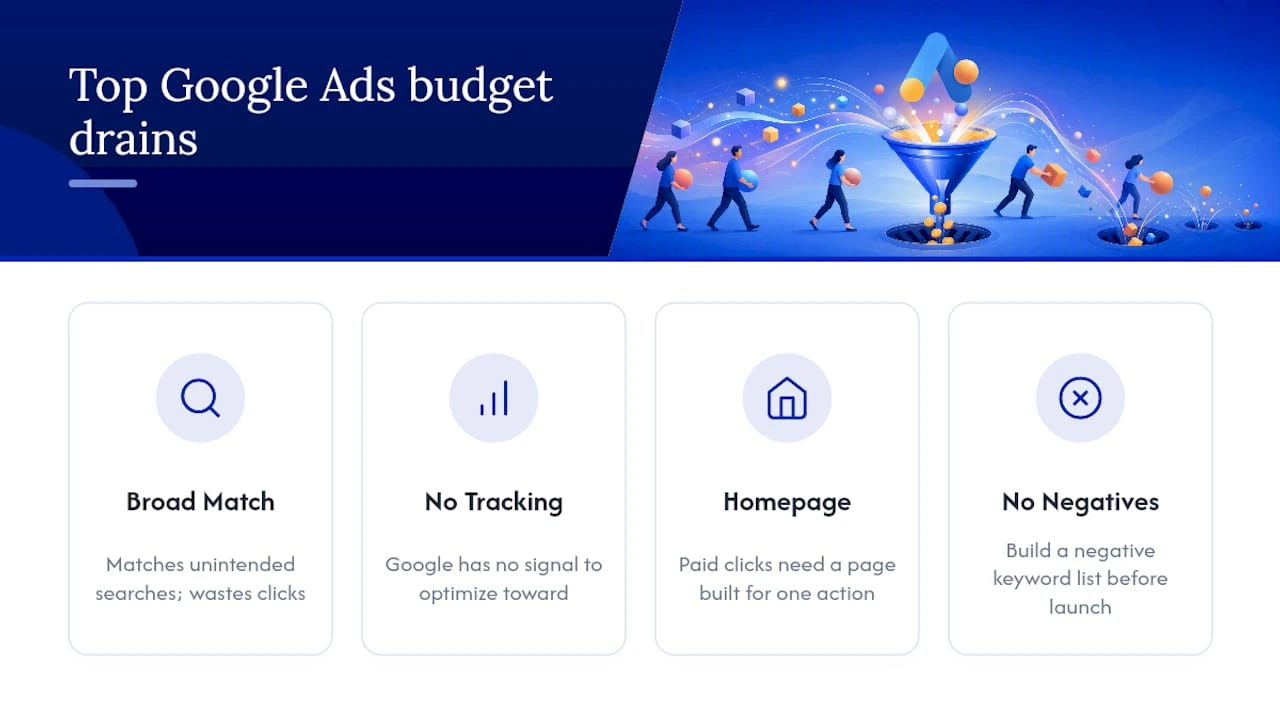
No conversion tracking. Without it, Google has no signal to aim for. Your budget gets spread across clicks that may never convert. Fix: install tracking before you spend a dollar.
Sending traffic to the homepage. A homepage tries to serve every visitor. A paid click needs a page built for one action. Fix: build or use a dedicated landing page for each campaign.
Wrong location targeting. By default, Google Ads includes “people interested in your location”. That can pull in users from across the country. Fix: in the location options, switch to “Presence: people in your targeted location”.
Including Display Network when you meant Search only. New campaigns default to “Search Network with Display expansion.” Display clicks are cheaper, but they convert at a fraction of Search rates. Fix: uncheck Display expansion when you create a Search campaign.
Skipping negative keywords. Negative keywords are searches you tell Google to skip. Every irrelevant click is money gone. Fix: build a negative keyword list before launch. Then review your Search Terms report every week for the first month.
Keyword themes that are too broad. Say you sell “email marketing software for restaurants”. Bidding on “marketing” wastes every impression. Fix: narrow your keywords to the exact words your buyer types.
Pro tip: Set a shared budget cap. Check your pacing report every Monday morning for the first 60 days. Google can spend up to double your daily budget on a single day. Knowing your weekly spend trend early prevents end-of-month surprises.
DIY vs hire an agency: how to decide
Manage Google Ads yourself if you are in the first 30 to 60 days and your monthly spend is still modest. Running your own account teaches you a lot, and that makes you a better client later. The stakes are also low enough to absorb mistakes.
Signs it is time to hire:
- Your monthly ad spend has grown well past a starter budget, and you are not hitting your target CPA.
- You have steady demand but no time to check the account each week.
- You need a plan across channels, with ads, SEO and landing pages working together.
- Leads are coming in, but your team cannot respond fast enough to close them.
- You want to add Performance Max or Shopping campaigns, and you have no experience with asset groups or feed management.
Kihan Marketing works with small businesses that need campaign management focused on results, not vanity metrics.
Not ready to hire, but want to grow beyond paid ads? Organic lead generation strategies can run alongside your campaigns. Over time, they cut how much you depend on ad spend.
What to do next: a practical 30/60/90-day plan
Days 1 to 30: Launch and measure
- Create your account, set up billing and define your conversion goal.
- Install conversion tracking for calls, forms and purchases before you run a single ad.
- Launch one Search campaign with 10 to 20 tightly themed keywords.
- Set location targeting to the area you actually serve.
- Add at least 20 negative keywords from day one.
- Write Responsive Search Ads with 8+ headlines and 3+ descriptions.
- Check the Search Terms report every week and add negatives.
Days 30 to 60: Refine and optimize
- Compare your CPA or CPL (cost per lead) with your target. If it is too high, check the landing page conversion rate first. Then check keyword relevance.
- Pause keywords with 50+ clicks and zero conversions.
- Test a second ad version in each ad group.
- Once you have 30+ conversions, switch bidding from Maximize Clicks to Target CPA.
- Grow your negative keyword list from the Search Terms data.
Days 60 to 90: Scale winners and test new channels
- Raise the budget by 15 to 20% on campaigns that hit your target CPA.
- If conversions are steady, think about adding Performance Max with your best creative assets.
- Test one new ad angle, such as a price-focused headline against an outcome-focused one.
- Review impression share. If it is below 50%, budget is likely the limit, not quality.
- Decide whether a broader digital marketing strategy makes sense, to add SEO or social beside your paid campaigns.
Before you restructure a campaign
Pro tip: Before you restructure a campaign, install tracking and let it run for two weeks. You need real data to know what to cut. Restructuring blind is just guessing with extra steps.
Key Takeaways
Google Ads works for small businesses when three things are in place. Install conversion tracking first. Match your budget to the competition in your field. Start with Search, then expand to Performance Max.
| Point | Details |
|---|---|
| Install tracking before spending | Conversion tracking is the single prerequisite; without it, no bidding strategy can optimize. |
| Match budget to competition | Start with a daily budget suitable to your competition level, increasing for more competitive industries to collect data. |
| Start Search, add Performance Max later | Search captures high-intent buyers; add Performance Max only after 30 to 50 tracked conversions. |
| Watch CPA weekly, not daily | Daily CPA swings are normal in the learning phase; weekly trends reveal what actually needs fixing. |
The thing most small-business owners get backwards about Google Ads
Most owners treat Google Ads as a traffic problem. They fixate on impressions, clicks and CTR (click-through rate), then wonder why the phone is not ringing. The real problem is almost always further down the line. It might be a landing page that does not match the ad’s promise. It might be a form with too many fields, or a phone number you cannot tap on mobile.
Google Ads is a system. The ad gets attention. The landing page earns the conversion. Conversion tracking tells you what worked. If one piece is missing, the whole system breaks, and no budget increase will fix it.
The businesses that get the most out of small budgets treat every dollar as a data point, not a bet. They launch small and measure fast. They cut what does not convert and scale what does. That habit matters more than any bidding strategy or keyword trick.
Two things are worth doing this week. First, open your Search Terms report and add every irrelevant search as a negative keyword. Second, load your landing page on a mobile phone. Time how long it takes to see the headline and the call-to-action button. If either takes more than three seconds, that is your biggest conversion problem, not your ad copy.
Kihan Marketing manages Google Ads so your budget works harder
A small Google Ads budget leaves no room for wasted spend. Kihan Marketing builds and manages campaigns for small businesses that need real leads, not just clicks. Every engagement starts with three things. First comes conversion tracking, then a review of your landing page. Last is a campaign structure built around your actual service area and target CPA.
Google Ads management covers account setup, conversion tracking, keyword research, ad copy and weekly optimization.
Ready to build a full digital marketing plan around your ads? Request a strategy session, and get a plan built around your own goals and budget.
Useful sources and official docs for deeper reading
Bookmark these before you launch your first campaign:
- Getting started with Google Ads: Tips for small businesses
- Discover how Google Ads works and how to create, set up and launch an ad campaign
- Campaign budget documentation, Google Ads
- Google Ads Budget and Bidding Strategy for Small Businesses (2026 Guide), DigitalSMB
Recommended
- How to Optimize Your Google Business Profile (2026)
- Google Ads Management Cost for Small Businesses 2026
- GA4 Setup for Small Businesses: Step-by-Step Guide
- Google Ads & Web Design to Generate More Leads
Frequently asked questions
Does Google Ads actually work for small businesses?
Yes, when the basics are in place. Search reaches buyers the moment they look for what you sell. Local service businesses like HVAC, plumbing, law and dental can see phone calls within days of launch. In Google’s guidance, 82 percent of small-business advertisers say digital ads reach customers more efficiently than traditional channels. Failed campaigns almost always lack conversion tracking.
Which Google Ads campaign type should a small business start with?
Start with Search. It targets people ready to buy, on a modest daily budget. It typically needs 30 to 60 days to give results you can read. Add Performance Max only after you have 30 to 50 tracked conversions, since it needs data to work. Smart campaigns suit the simplest setups, with the lowest daily budget of the group.
How much should a small business budget for Google Ads?
Work backwards from your goal. Multiply your target monthly conversions by your target cost per acquisition. Twenty phone calls a month, times your target cost per call, gives you a starting number. There is no required daily minimum. But crowded fields, such as personal injury law or addiction treatment, need a larger daily budget. Their cost per click runs higher.
How long does it take to see results from Google Ads?
Plan on 30 to 60 days. Google’s learning phase runs that long, and cost numbers are unstable during it. Steady numbers usually appear around day 45 to 60. Smart and Local campaigns can read sooner, at 2 to 4 weeks, while Performance Max needs 6 to 8 weeks. Review results weekly rather than daily, since daily swings are normal.
What is the most common mistake that drains a small business ad budget?
Running ads without conversion tracking. No bid strategy can improve results when it cannot see what converted, so the budget spreads at random. Close behind are broad match keywords before you have 50 conversions, and sending traffic to your homepage. Then come Display expansion left on, loose location targeting and no negative keyword list at launch.
Should I manage Google Ads myself or hire an agency?
Manage it yourself for the first 30 to 60 days, or while monthly spend stays modest and mistakes are cheap. Hire help once spend grows well past a starter budget and your cost per acquisition disappoints. The same goes when you need Performance Max, Shopping, or paid ads and SEO working together. Kihan Marketing offers a free strategy call.
Is SEO or Google Ads better for a small business?
They do different jobs and work well together. Google Ads can bring calls within days, because it reaches people searching right now. SEO and other organic lead generation run alongside your campaigns and, over time, cut how much you depend on ad spend. A sensible order: start with Search ads, then add SEO once your campaigns are steady.
How do I know if my Google Ads are working?
Watch cost per acquisition, not clicks. Compare your CPA with your target each week, since daily swings are normal. If it runs high, check your landing page conversion rate first, then keyword relevance. Also check impression share: below 50% usually means budget is the limit, not quality. None of this works without conversion tracking in place.