
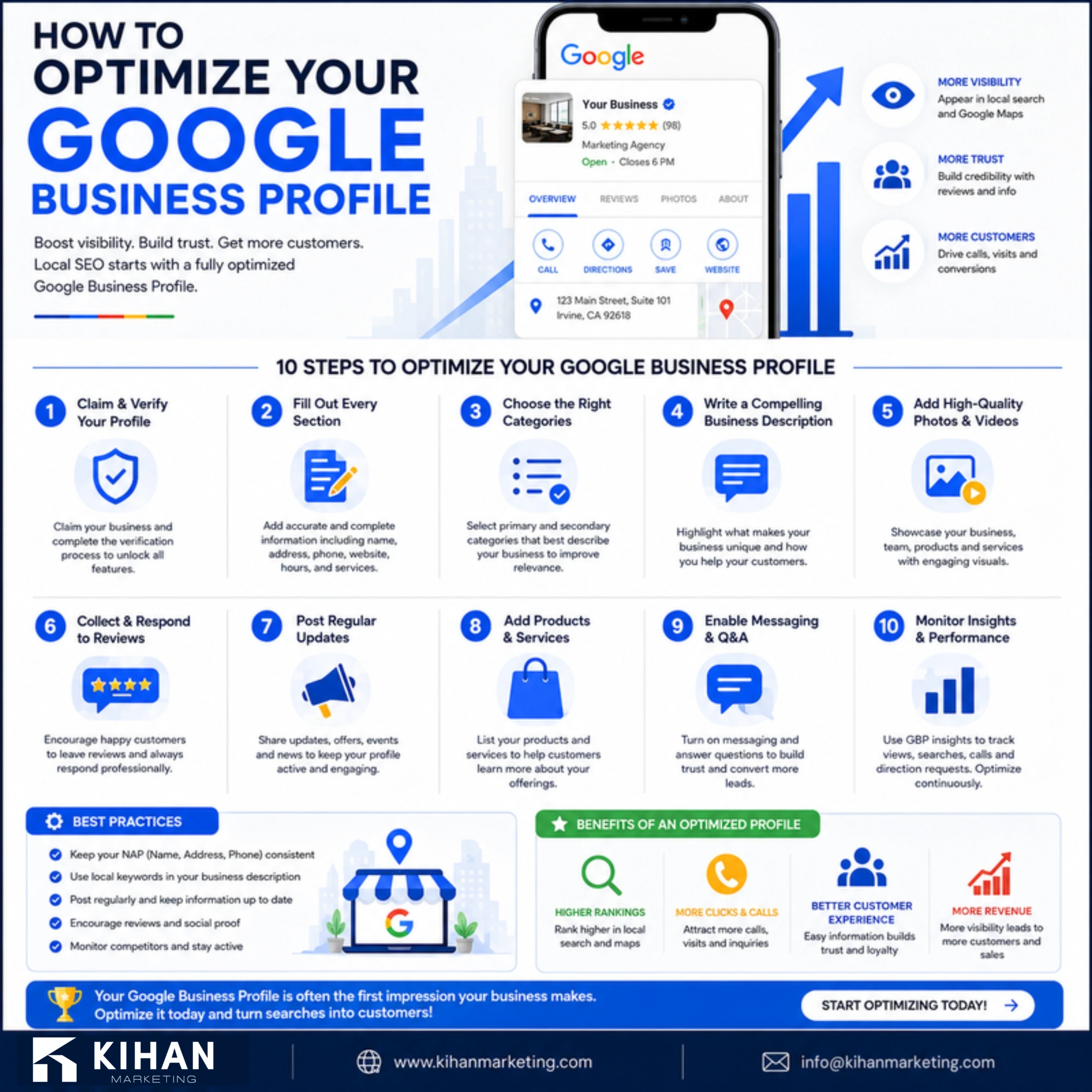
Your Google Business Profile is your listing on Google. It is what competes for the map pack when people nearby search for what you do. This guide to Google Business Profile optimization covers each step, what gets a profile suspended, and how to read the results. Quick answers are in the FAQ at the end.
The map pack goes to profiles that are complete, accurate and active. The primary category matters most, then every field filled in. Real photos, a steady flow of reviews and regular posts keep the profile active. Stay clear of what gets a profile suspended, and judge progress by calls and direction requests, not views.
TL;DR
To get the most from your Google Business Profile, choose the right primary category and fill in every field. Add real photos and list all your services. Collect recent reviews, reply to them, and post regularly. A complete, active profile wins the map pack, which gets most local clicks. No other local SEO task pays back as much.

Get the Category and Fields Right
Start with the correct primary category. It is the biggest relevance signal. Add any secondary categories that are accurate too. Then fill in every field: name, address, phone, hours, website, and a clear description. Google rewards complete, accurate profiles. Incomplete ones quietly lose the map pack to competitors who finished the job.
Add Real Photos and All Your Services
Upload real photos of your work, your team and your location, and refresh them often. List every service you offer, each with a description. A detailed profile gives Google more to match with searches. It also gives customers more reasons to choose you. Real photos beat stock photos every time.
Build Reviews and Respond to Them
Reviews are a top local ranking factor and a major trust signal. Ask every happy customer for one, and make it one tap with a direct link. Then reply to every review, good or bad. A steady flow of recent reviews is one of the strongest things you can do for local SEO.
Post Regularly and Stay Active
Treat the profile as a living asset, not a listing you set up once and forget. Post updates and offers, answer questions quickly, and keep your details current. An active profile tells Google it is relevant and well known. That helps you hold your place in the map pack and climb over time.
Related reading
- Local SEO for Contractors: How to Rank in the Google Map Pack
- Local SEO vs National SEO: What’s the Difference?
- What Is Local SEO and How Does It Work?
The Complete Field Checklist
Most profiles are only half filled in. Google uses what is there to judge relevance, so each empty field is a search you could have matched and did not.
- Primary category, chosen carefully. This single field has the most impact on the profile. Pick the one that describes what you most want to be found for. Then add secondary categories for the rest. Changing it changes which searches you show up in.
- Every service, listed on its own. Not a summary. Name each service the way customers name it, and give it its own description where the field allows one.
- Business description. Say what you do, who you do it for, and where. Write it for a person deciding whether to call, not as a list of keywords.
- Hours, including holidays and special hours. Wrong hours earn a bad review from someone who drove to a closed door. Google also shows closed businesses less often.
- Attributes. Wheelchair access, appointment required, languages spoken, payment methods. These fields are small, but they decide real choices for real customers.
- Products, where they apply. This field is underused. It is a place to describe specific offerings, with images that have nowhere else to live on the profile.
Service Area or Storefront Address
If customers come to you, show your address. If you travel to them, set service areas and hide the address. Listing a place customers cannot visit breaks Google’s guidelines, and it puts the profile at risk.
Service areas do not stretch your reach the way people hope. How close you are to the searcher still shapes the results. So listing twenty cities does not make you show up in twenty cities. Set the areas you truly serve. Then put the effort into your website’s area pages instead, since they have no such limit.
The Questions Section Almost Nobody Uses
Anyone can ask a question on your profile, and anyone can answer it, even people who do not work for you. A question left unanswered, or answered wrong, sits on your listing indefinitely.
Post the questions you get asked most and answer them yourself. Think parking, payment, whether you take walk-ins, and how quickly you can come out. It takes fifteen minutes, and it fills the space before someone else does.
What Gets a Profile Suspended
- An address you do not operate from. Virtual offices, mailboxes and a friend’s address are the most common cause of a suspension. Getting reinstated is slow.
- Keywords stuffed into the business name. The name field must be the real business name. Adding your city and services to it breaks the guidelines, and competitors do report it.
- A category that does not match the business. That means choosing categories to show up in more searches, not to describe what you do.
- Multiple listings for the same location. Duplicates split your reviews and can get everything suspended. Merge them or remove them.
- Reviews that look bought. A sudden burst of reviews from accounts with no history draws attention. Steady, genuine reviews are both safer and more convincing.
How to Read the Performance Tab
- Split searches for your name from searches for what you do. If nearly all of them are for your business name, the people finding you already knew about you. Growth comes from the other group.
- Watch calls and direction requests, not views. Views move when Google changes its layout. Calls and directions are actions a person chose to take.
- Read the search terms list. It shows the phrases that brought up your listing. It is the closest thing a local business has to free keyword research.
- Compare month over month, not day to day. Local search is seasonal and noisy. One bad week is rarely a signal.
- Check it after any change you make. A new primary category or new services should show up here. If nothing moves in a few weeks, the change was not the lever you thought.
FAQ: Google Business Profile
How do I optimize my Google Business Profile?
Set the right category and fill in every field. Add real photos, list all your services, collect reviews and reply to them, and post regularly.
Why is my Google Business Profile not showing up?

Often the profile is incomplete, has the wrong category, lacks reviews, or shows business details that are not consistent.
How important are reviews for Google Business Profile?
Very. Reviews are a top local ranking factor and a major trust signal for customers.
How often should I post on Google Business Profile?
Regularly. Weekly is a good pace. It shows the business is active and keeps your profile fresh.
How long does it take for profile changes to show up?
Simple edits often appear within hours to a few days. Category changes, and anything Google needs to review, can take longer. Effects on rankings usually take a few weeks to settle.
Does posting on Google Business Profile help rankings?
Posts mainly help the person already looking at your listing. They show the business is active and answer questions before someone calls. Treat them as a way to turn lookers into callers, not as a ranking lever.
Can I have more than one profile for my business?
One per physical location, and one per practitioner in some professions. Several profiles for the same location are duplicates. They split your reviews, and they can get the listings suspended.
Why does my competitor rank above me with fewer reviews?
Usually they are closer to the searcher, or their primary category is a better match. Distance is the one factor you cannot change. That is why your effort belongs in the category and in how complete your profile is.
What is Google Business Profile optimization?
It is the work of making your business listing on Google complete, accurate and active. The aim is to show up in the map pack, where most local clicks go, when people nearby search for what you do. It is not a one-time setup. You keep the details current, keep reviews coming, and keep posting.
How much does Google Business Profile optimization cost?
It depends on what your profile needs. The cost moves with how many locations you have and how much of the profile is missing or wrong. It also moves with how much review and posting upkeep you want handled. Our pricing page explains how that work gets scoped. A free marketing audit is a good first step.