
Powerful AppFolio listings. Completely under your control.
Pull your AppFolio property and unit data onto your own WordPress site — server-side, no iframe — and shape every part of how it’s shown: card layout, per-unit links, the interactive map, and every color and font, straight from the dashboard.
- Licensed per domain
- Starting at $199 / site / year
- WordPress Compatible
- Easy Shortcode Setup
- Nonce & SSRF Protected
- Actively Maintained
Everything you need to run listings without touching a code editor.
Six areas of control, all driven from the WordPress dashboard — nothing here requires a theme edit or a code snippet.
Dynamic AppFolio Listings
Listings are fetched server-side from your AppFolio feed and cached — no manual re-entry, and no iframe embedding AppFolio’s own page inside yours.
Interactive Map
Units at the same address group into one pin with a count badge. Hovering a card highlights its pin, and hovering a pin highlights its card.
Custom Listing Links
Point any individual unit at a virtual-tour URL instead of the default AppFolio destination — managed from a dedicated per-listing table.
Complete Design Control
Indexable Listing Pages
Filters, Search & Pagination
Meet Appfolio Listings Pro
Before
iframe src="appfolio.com/listing"
Appfolio Listings Pro
Server-side fetch + parse
After
div class="apflp-card"
Send every listing exactly where you want.
By default, the Details button sends visitors to your own site’s listing page or straight to AppFolio — your choice, set once in Settings. Any single unit can be overridden with its own destination, like a Matterport tour, without touching the rest of the feed.
Default behavior
Details Button Opens" sends visitors to this site's listing page or AppFolio's — the host is resolved from your own Base URL, so nothing is hard-coded per site.
Per-unit override
Any unit can carry its own custom URL — a virtual tour, a floor plan PDF, anything with a link — enabled individually from the table on the right.
Rename the feature
The label isn't locked to "MeterPort" — the feature name and the button text are both editable fields, so the button can read "Virtual Tour," "Floor Plan," or anything else.
MeterPort Links
| Address | AppFolio Listing ID | Custom Link | Action |
|---|---|---|---|
| 1420 Elliott Ave W, Unit 204 | 1004521 |
https://my.matterport.com/show/…
Enabled
|
Save |
| 1420 Elliott Ave W, Unit 205 | 1004522 |
https://...
Enabled
|
Save |
| 802 Queen Anne Ave N | 1004498 |
https://my.matterport.com/show/…
Enabled
|
Save |
Five steps from iframe to indexed
Most sites are live with real, filterable listings inside an afternoon.
Install & Activate
Connect AppFolio
Brand It
Drop In a Shortcode
Go Live
Who this is for
Property management companies
Turn your AppFolio feed into a real marketing asset
You're already paying for AppFolio. This makes the listings it generates actually work for your website's SEO instead of sitting invisible inside a frame.
Multifamily & apartment communities
One page per community, one map, one brand
Show available units per building with dedicated filters, a map view, and consistent branding across every property in your portfolio.
WordPress agencies & marketers
A repeatable listings solution for every PM client
Configure once, template it, and roll it out across client sites, brand colors and templates keep every install on-message.
Portfolio owners with multiple regions
Every region gets its own clean shortcode
Property Groups let you save each building or region as its own AppFolio URL, with an auto-generated grid or slider shortcode ready to paste anywhere.
What changes on day one
AppFolio's own page, embedded — default fonts, default layout, no brand colors, and not indexable as your site's content.
Rendered as real HTML on your site — your fonts, your colors, your button labels, on a real WordPress URL.
Every major capability, in detail
What it does, why it matters, and who it’s built for.
01 / No-Iframe Rendering Engine
Your listings, rendered as real HTML on your own domain
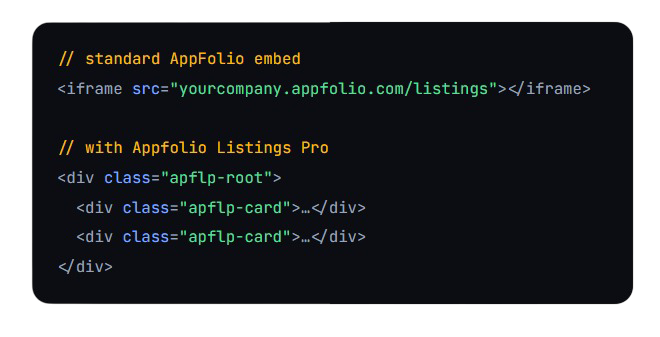
What it does: fetches your public AppFolio listings pages on the server, parses the actual listing data with a proper DOM parser, and outputs native HTML, not an embedded frame.
Why it matters: content that lives in your page’s HTML is content Google can crawl, index, and rank. An iframe pointed at another domain never gets that credit.
How it works: requests are restricted to the same host as your configured AppFolio URL, a same-host allowlist that blocks any other destination outright.
- For anyone tired of listings that don't show up in search
02 / Individual SEO Listing Pages
Every unit gets a real, indexable page
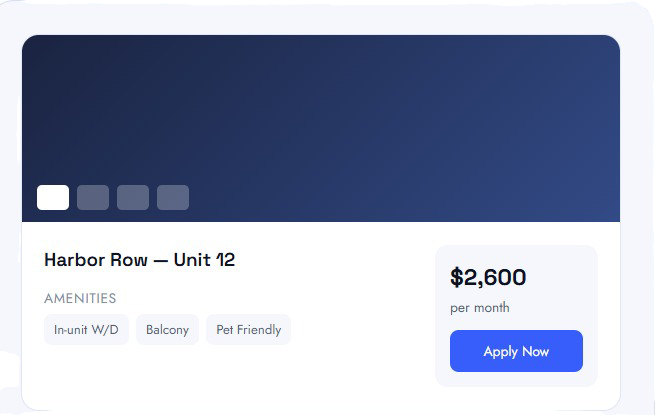
What it does: builds a dedicated page at /appfolio-listing/{id}/ for each unit, with a full photo gallery, an overview, rental terms, pet policy, and amenities pulled straight from the listing’s real AppFolio detail page.
Why it matters: a listing with its own URL is a listing you can link to, share, run ads to, and rank for its own address and floor plan.
How it works: the page data is cached and served from your own rewrite rule, with sidebar Apply Now / Contact Us actions and one-click social sharing built in.
- For turning every vacancy into its own landing page
03 / Dynamic Filters & Sorting
Filter options that reflect real inventory, automatically
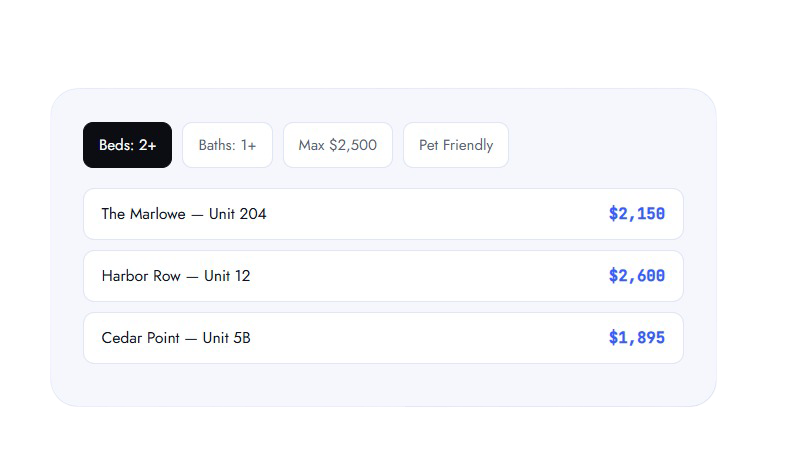
What it does: search, min/max rent, beds, baths, and a pets filter, all built from the actual values present in your live listings, not a hardcoded list.
Why it matters: renters never see a “3 bed” filter option when nothing 3-bed is available, every filter reflects what’s real, right now.
How it works: sorting supports featured order, newest, rent (either direction), and beds/baths, with pagination or a show-all mode for smaller portfolios.
- For helping renters narrow down fast
04 / Interactive Map
A map view your renters can actually browse
What it does: a toggleable “View with Map” mode that geocodes your live listings into pins, with a configurable default zoom and map height.
Why it matters: location is often the first filter a renter applies, before beds, before rent. A map lets them start there.
How it works: runs on your own Google Maps API key (Maps JavaScript API + Geocoding API), configured once from the Map Settings screen.
- For portfolios spread across a city or region

05 / Templates & Brand Colors
Three premium templates, or build your own
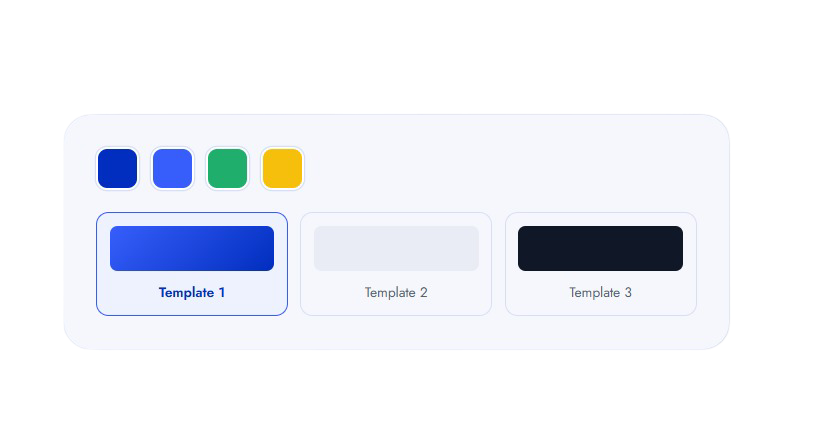
What it does: choose between three built-in premium card templates or write fully custom HTML using placeholder tokens like {{rent}}, {{beds}}, and {{apply_link}}, sanitized against a safe HTML allowlist.
Why it matters: a listings grid that matches your site’s exact colors and layout looks like it was built in-house, not bolted on.
How it works: primary and secondary colors set via a native color picker instantly re-theme buttons, links, and active states across the whole plugin, plus a custom CSS box for anything else.
- For matching listings to your existing brand
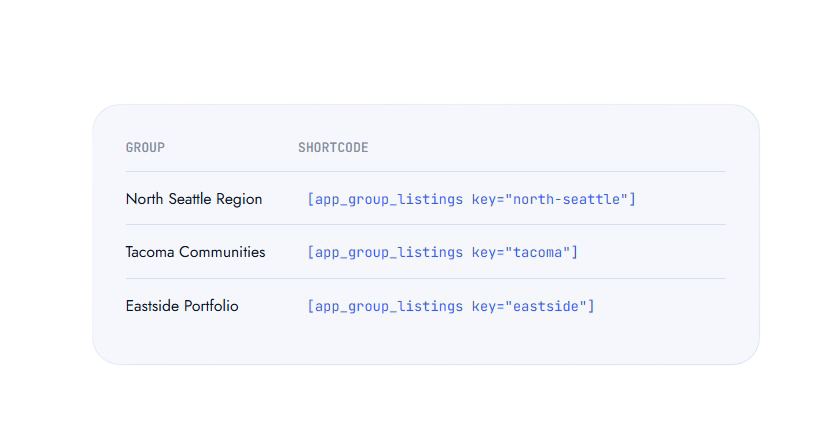
06 / Property Groups
Every building, its own clean shortcode.
What it does: save any number of AppFolio listings URLs as named Property Groups, one per building, community, or region, each generating its own grid and slider shortcode automatically.
Why it matters: portfolios with multiple properties can show the right units on the right page, without duplicating settings or fighting with one giant combined feed.
How it works: pages use [app_group_listings key="…"], matched safely by a generated key with no manual URL wrangling.
- For multifamily portfolios & multi-region owners
Built the way WordPress expects
No shortcuts on the parts that keep a site safe and fast.
SSRF-protected fetching
Every remote request is checked against a same-host allowlist tied to your configured AppFolio URL, no arbitrary destinations, ever.
Nonce-verified AJAX + capability checks
All AJAX endpoints verify a WordPress nonce, and every admin action requires manage_options.
Sanitized custom templates
Custom HTML templates run through a tight wp_kses allowlist, safe by default, not by convention.
Real DOM parsing, not regex
Listing data is extracted with DOMDocument/DOMXPath, which holds up against markup changes far better than pattern matching.
Stale-while-revalidate caching
Listings are cached for a configurable window, with a fetch lock that prevents duplicate requests from piling up under load.
Capped, paginated crawling
Large portfolios are fetched page by page up to a safe cap, so one big property list can't take down a page load.
Compatibility & integrations
- WordPress (any theme)
- AppFolio public listings
- Google Maps + Geocoding API
- Flickity gallery & slider
- Page builders (shortcode-based)
- Elementor, Gutenberg & more
Requires your property’s AppFolio listings to be publicly viewable, and your own Google Maps API key for the map view. No AppFolio API credentials are needed, the connection is a single base URL.
Choose your license
Every tier ships the full plugin, every template, filter, the map, and Property Groups. Tiers scale by how many domains you activate it on.
Single Site
- Full feature set, no-iframe engine
- Individual SEO listing pages
- Map view + Property Groups
- 1 year of updates & email support
Agency
- Everything in Single Site
- Activate on up to 5 client domains
- Priority support
- 1 year of updates & support
Unlimited
- Everything in Agency
- No cap on licensed domains
- Priority support
- 1 year of updates & support
Why it's worth it
What's an hour of dev time worth to you?
Custom-built equivalent
Appfolio Listings Pro
Custom development figure is a general market estimate for reference only, not a quote.
How the license actually works
Active
Full access
Grace period
Still live, with a warning
Expired
Settings lock, listings pause
Renewal
One key, one domain
What our clients say
EXCELLENT


Wei Landgraf
4 months ago

I can’t recommend Kihan Marketing highly enough. Kiran and his team truly went above and beyond in helping me with both my social media and my website, and the results speak for themselves.

Shelley Stroeve
2 months ago
I recently worked with Kihan Marketing to design my new website, and I couldn’t be more thrilled with the experience. From start to finish, they were incredibly responsive, communicative, and attentive to every detail.

Listya
4 months ago
Working together felt very collaborative and aligned. Communication flowed easily, tasks were well-organized, and we shared the same attention to detail throughout the process. It genuinely felt like working as one team.

Nicholas Riley
5 months ago
Kiran and his team are simply fantastic! I’ve worked with 16 different third party marketing teams and they are by far the best. They are incredibly smart, responsive and an overall pleasure to work with. Since working with them over the last 2 months.

IDR Office
3 weeks ago
Kihan Marketing Organization is friendly, professional, and very responsive. Kiran and his team move quickly, communicate clearly, and deliver high-quality work in both website development and social media marketing. They stay organized, pay attention to detail.

Reika
4 months ago
Kihan Marketing is a fantastic team to work with, friendly, professional, and highly responsive. They are highly responsive and quick to take action, ensuring projects move forward efficiently. Despite working in a fast-paced environment, they remain professional, organized.

San Innovation
4 months ago
Kihan Marketing Organization has been great to work with. The team is professional, responsive, and focused on delivering real results. I’m very satisfied with their service and would highly recommend them.
Frequently Asked Questions
Stop letting an iframe hide your listings
Install Appfolio Listings Pro, connect your AppFolio URL, and give every listing a real, crawlable home on your own site.
- Licensed per domain
- 1 year of updates & support included
- Support: info@kihanmarketing.com
Get your free proposal
Tell us about your project and we will be in touch within one business day.
Ready to grow?
Three simple steps from first hello to real results.
1. Contact us
Fill out the form and tell us about your goals.
2. We build your plan
A custom strategy and design built to rank and convert.
3. You get results
Launch, then measurable growth month over month.
- Seattle, WA
- (425) 954-3452
- info@kihanmarketing.com
- Monday to Friday, 9am to 6pm PST