
GA4 Setup for Small Businesses: A Step-by-Step Guide
Ask AI to Summarize




TL;DR
A proper GA4 setup for a small business takes about 60 to 90 minutes and comes down to four things: install the tag, define your real conversions (calls, form fills, bookings), filter out internal traffic, and link Google Ads and Search Console. Skip the 200 reports Google shows you by default. If a metric does not tie to a lead or a dollar, ignore it. Most small businesses only need 4 to 6 events tracked well.
Why GA4 Matters for Small Businesses
Let us be blunt: most small businesses have GA4 installed and have never made a single decision from it. They glance at “users” and “bounce rate,” feel vaguely informed, and close the tab. That is not analytics. That is decoration.
GA4 matters because it is the free, default record of where your customers come from and what they do before they buy. Done right, a GA4 setup for a small business answers one question: which marketing actually produces leads and revenue? Done wrong, it produces a dashboard of numbers that move up and down and mean nothing.
We do not care how many people visited your site. We care how many called, booked, or filled out a form, and where those people came from. That is the entire philosophy behind this guide. If you want help connecting that data to actual lead generation, that is the work that pays off. The setup below is the foundation.
What You Need Before You Start
You can do this yourself. You do not need a developer for a standard small-business website. Before you begin, gather:
- A Google accountyou control (not your former web designer’s).
- Admin access to your website, or your content management system login.
- Google Tag Manager(recommended) or the ability to paste a tag into your site header.
- A list of your real conversion actions.Write these down first: phone calls, contact form submissions, quote requests, online bookings, newsletter signups.
That last item is the one most people skip, and it is the most important. If you do not know what counts as a win for your business, no analytics tool can tell you. Decide before you touch GA4.
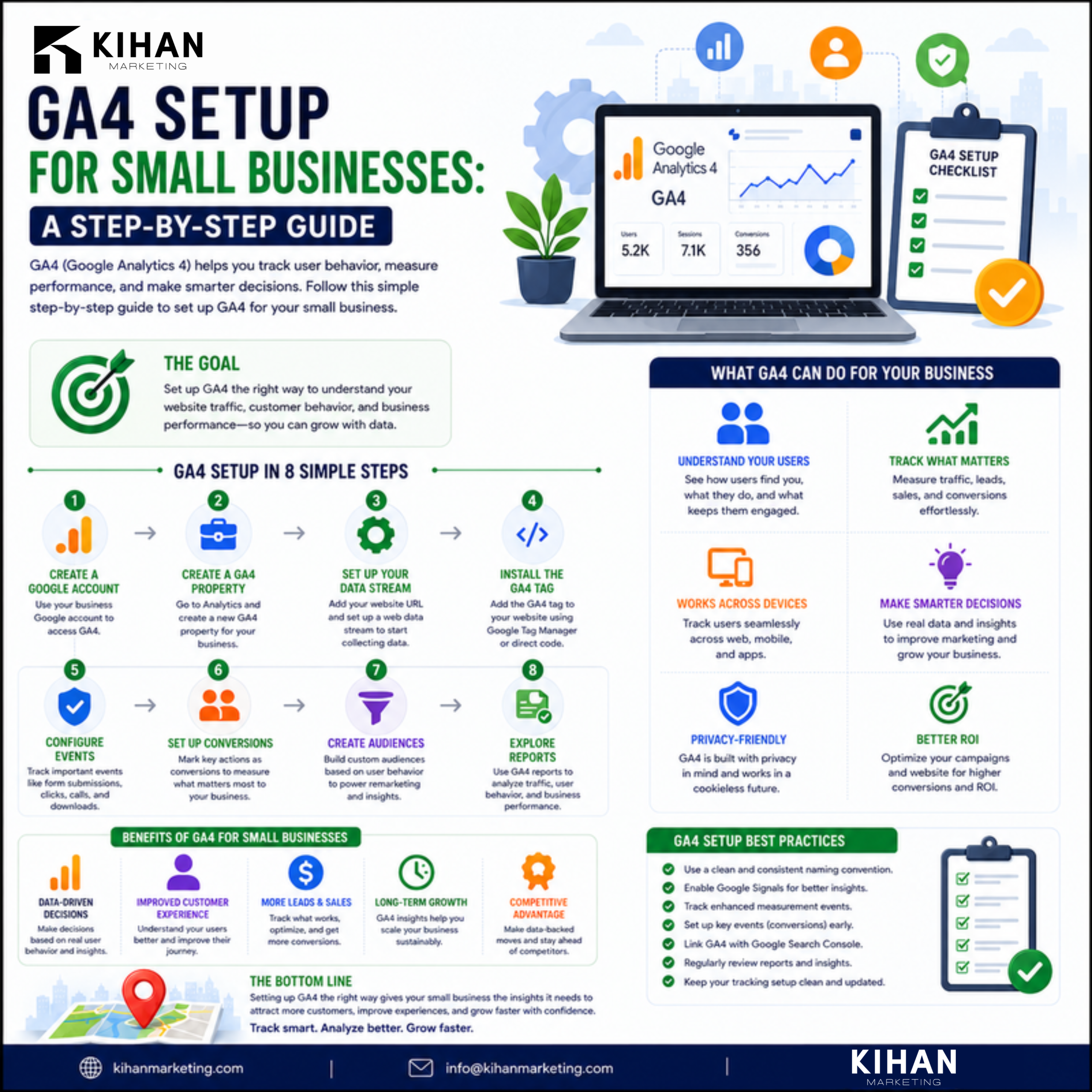
GA4 Setup for Small Business: Step by Step
Here is the full GA4 setup for a small business, in order. Budget about 60 to 90 minutes.
- Create the GA4 property.In Google Analytics, go to Admin, create a new property, set your time zone and currency correctly. Currency matters if you ever track revenue.
- Add a web data stream.Enter your website URL. GA4 generates a Measurement ID that starts with “G-“.
- Install the tag.The cleanest method is Google Tag Manager: create a GA4 Configuration tag, paste in the Measurement ID, set it to fire on All Pages, and publish. If you are not using Tag Manager, paste the Google tag snippet into your site header, or use your platform’s built-in GA4 field.
- Verify it is firing.Open GA4 Realtime, then visit your own site. If you see yourself appear, the tag works.
- Turn on enhanced measurement.GA4 auto-tracks scrolls, outbound clicks, and file downloads. Leave this on; it is free signal.
- Define your conversions (key events).This is the real work, covered in the next section.
- Filter internal traffic.Exclude your own IP so your team’s visits do not pollute the data.
- Set data retention to 14 months.Admin, Data Settings, Data Retention. The default is shorter and you will want the history.
Once the tag fires and conversions are defined, you have a working setup. Everything after this is refinement.
The Conversions That Actually Matter
This is where a GA4 setup for a small business succeeds or fails. Google will happily show you dozens of metrics. Almost none of them matter. Here is how to separate signal from noise.
Metric | Track it? | Why |
Form submissions | Yes, as a key event | Direct lead, ties to revenue |
Phone call clicks | Yes, as a key event | Highest-intent action for most local businesses |
Booking / quote requests | Yes, as a key event | Bottom-of-funnel intent |
Outbound clicks to booking tools | Yes | Catches conversions that finish off-site |
Pageviews | Context only | Volume, not value |
Bounce rate / engagement rate | Rarely | Easy to misread, rarely actionable |
“Users” by itself | No | A vanity number with no decision attached |
To set up a conversion, trigger the event (a thank-you page view or a button click work well), then in Admin mark that event as a key event. For phone numbers, track clicks on the “tel:” link. For forms, track the confirmation page or a form-success event. Most small businesses need only 4 to 6 of these tracked well. This is the same lead-first thinking we apply to roofing and home-services marketing, where one booked job is worth more than a thousand pageviews.
Connecting GA4 to the Rest of Your Stack
GA4 is far more useful when it talks to your other Google tools. Three links are worth doing on day one.
Search Console
Link Search Console to GA4 to see which organic search queries bring traffic and how those visitors behave. This bridges your SEO and your analytics in one view, and it is the starting point for any serious SEO effort.
Google Ads
If you run ads, link the accounts so your GA4 conversions flow into Google Ads. This lets the ad platform optimize toward real leads instead of clicks. Without this link, you are paying for traffic and guessing at results.
Google Business Profile
For local businesses, tag the links in your profile with UTM parameters so GA4 can attribute calls and visits that start from your map listing. If your profile is not fully optimized, that work belongs alongside your analytics; see Google Business Profile optimization.
These connections turn GA4 from a passive report into a feedback loop that tells you where to put your next dollar.
The three reports a small business should actually open
Forget the 200 reports GA4 ships with. For a small business, three are enough:
- Traffic acquisition.Shows which channels (organic, paid, direct, referral) bring visitors and, more importantly, which bring conversions. This is your where-do-leads-come-from report.
- Conversions (key events).Shows how many of each conversion happened and the trend over time. If form fills dropped last month, you want to know why.
- Landing pages.Shows which pages people enter on and which ones convert. This tells you where to invest in content and where pages are leaking.
Open these once a month, compare against the prior month, and write down one decision you will make from what you see. That single habit puts you ahead of nearly every small business that installed GA4 and never looked again.
Common GA4 Setup Mistakes That Waste Your Data
We see the same mistakes on nearly every account we audit.
- No conversions defined.The tag fires, pageviews accumulate, and nothing is marked as a key event. The data is technically there and practically useless.
- Internal traffic not filtered.Your own team inflates the numbers, especially on a small site, making every metric unreliable.
- Tracking everything instead of what matters.Forty events, none of them tied to revenue, is worse than five that are.
- Double-tagging.GA4 installed through both a plugin and Tag Manager double-counts everything. Pick one method.
- Ignoring it after setup.Analytics you never open is a sunk cost. Block 20 minutes a month to actually read it.
If your current setup has any of these problems, the data you have been “tracking” probably cannot be trusted. That is worth fixing before you make another budget decision. A free SEO and analytics audit will surface most of these in minutes.
FAQ: GA4 Setup for Small Businesses
A standard GA4 setup for a small business takes about 60 to 90 minutes: install the tag, define 4 to 6 conversions, filter internal traffic, and link Google Ads and Search Console. Complex e-commerce sites take longer.
Not strictly, but it is the cleaner option. Tag Manager lets you manage GA4 and conversion tracking without editing site code each time. For a simple site, the built-in GA4 field or a single tag in the header also works.
Yes. Standard GA4 is free and more than enough for nearly every small business. The paid tier (GA4 360) is built for enterprise data volumes you are unlikely to reach.
Track real conversions: form submissions, phone-call clicks, bookings, and quote requests. Treat pageviews and users as context, not goals. If a metric does not tie to a lead or a dollar, ignore it.
GA4 uses an event-based model and counts sessions and engagement differently than the old Universal Analytics. The numbers will not match. Focus on trends within GA4 rather than comparing across the two systems.
A clean GA4 setup is not about collecting more data. It is about collecting the few numbers that actually drive decisions and ignoring the rest. Get the tag installed, define your real conversions, filter your own traffic, and link your Google tools. That is the whole job. If you would rather have it built right the first time and tied to actual lead generation, see our pricing or start with a free SEO audit to find out what your current data is hiding.
Related reading